Introduction
“How does my running form look?” This is a question every runner wants to know, yet few truly face the answer. It wasn’t until slow-motion video on phones became widespread that video-based form analysis moved from sports science labs into everyone’s pocket. Today’s iPhone and Android flagships commonly support 240fps or even 960fps slow motion, enough to clearly capture every running detail. This article teaches you how to set up, film, analyze, and provides improvement suggestions for common running form issues seen among Taiwanese runners.
Camera Settings and Setup Methods
Phone Settings:
- Enable slow-motion mode: iPhone select 240fps (1080p), Android flagships select 240fps or higher
- Turn off image stabilization (IS/OIS) to prevent stabilization algorithms from making running motion look deceptively smooth
- Bright outdoor sunny conditions work best; on indoor treadmills, ensure adequate lighting
Camera Positions (Three Essential Angles):
| Angle | Camera Position | Key Observation Points |
|---|---|---|
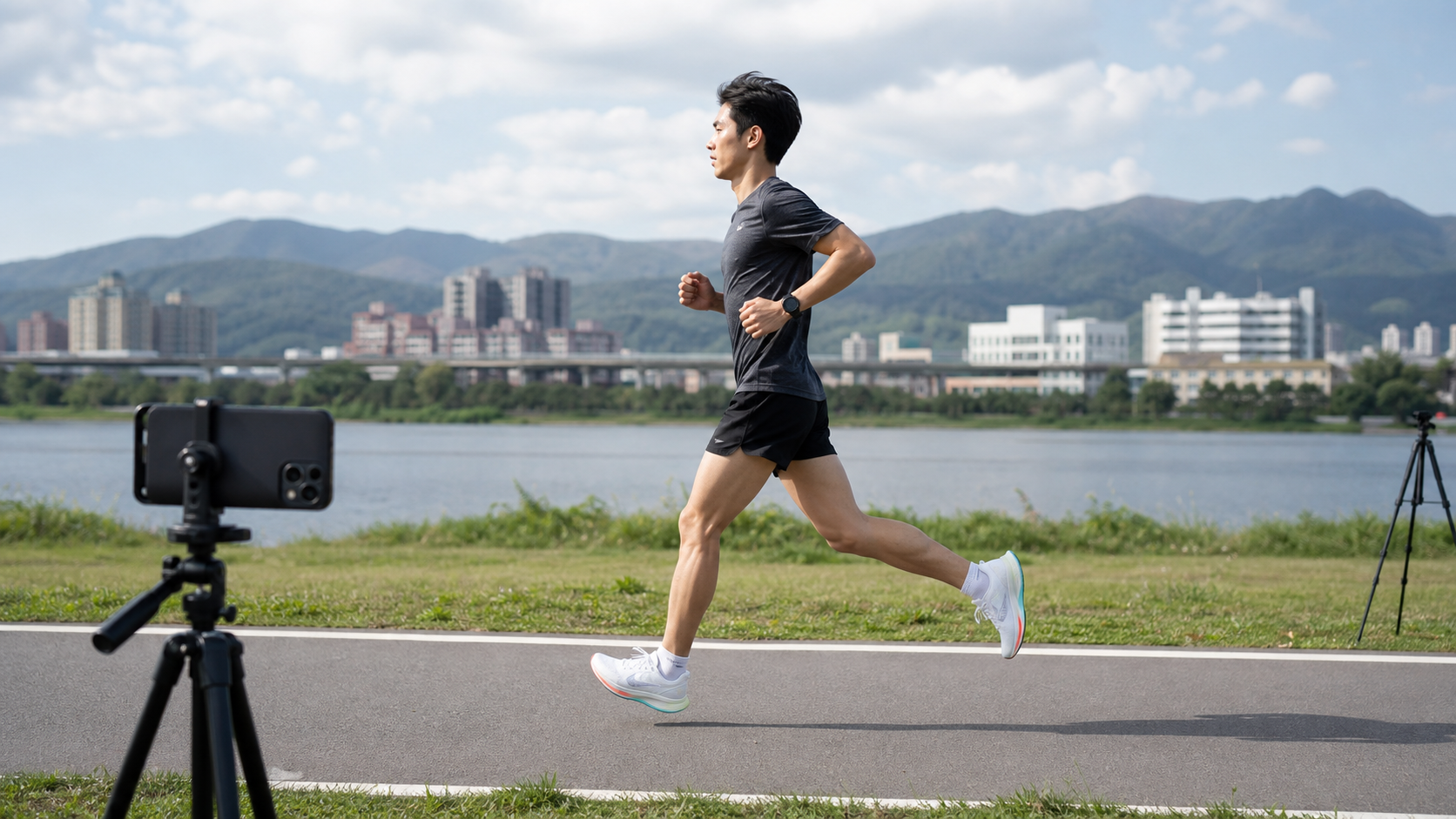
| Side 90° | Direct side, waist height | Foot strike position, torso lean angle, stride length |
| Rear | Direct behind, hip height | Pelvic stability, knee valgus, foot external rotation |
| Front | Direct front, waist height | Arms crossing midline, head position |
Practical Tips:
- Mount the phone on a water bottle holder, tripod, or have a running buddy hold it
- Run at your usual pace (don’t deliberately “perform” a pretty form)
- Record continuously for 20–30 seconds to capture a steady running state rather than the adaptation phase at the start
Side View Analysis: Five Key Observation Points
1. Foot Strike Position (Most Important)
- Ideal: Foot lands directly beneath the hips or slightly behind
- Common issue: Foot lands ahead of the knee (overstriding), creating braking force
- How to check: Pause the video at the moment of foot contact and see if the ankle is ahead of the knee
2. Torso Lean Angle
- Ideal: From ankle to head, the body has a 5–10 degree forward lean
- Common issue: Torso is vertical or even leaning back, indicating the center of gravity is shifted rearward
- How to check: Draw an imaginary line from ankle to head on the video and observe the angle
3. Elbow Angle
- Ideal: Elbows at approximately 90 degrees, hands relaxed (like holding a potato chip without breaking it)
- Common issue: Arms nearly straight, wrists overly clenched into fists, wasting upper body energy
4. Flight Time
- Slow-motion observation: The time from each foot leaving the ground to the next foot landing
- Shorter flight time is better, indicating a compact running rhythm
5. Head and Neck Position
- Ideal: Neck extends from the spine, eyes looking at the ground 10–15 meters ahead
- Common issue: Looking down (neck flexion) or tilting the head back, disrupting spinal alignment
Rear View Analysis: Pelvic Stability Check
From the rear slow-motion view, you can observe:
Pelvic Drop (Trendelenburg Sign):
- Observation: At each foot strike, does the pelvis drop on the side opposite the supporting leg
- A drop exceeding 3–5 degrees indicates weak hip abductors (gluteus medius)
- Improvement: Single-leg stance training, clamshells, lateral band walks
Knee Valgus:
- The knee collapses inward at the moment of foot strike, commonly seen in female runners
- Cause: Weak gluteal muscles, the knee cannot stay directly above the toes
- Improvement: Ensure knees track over toes during squat training, glute bridge exercises
Recommended Free Analysis Tools
- Hudl Technique (Free App): Allows drawing lines, pausing, and angle measurement on video; a commonly used analysis tool by running coaches
- Coach’s Eye (Paid): More complete sports video analysis features, supports side-by-side comparison
- Built-in phone slow-motion playback: Simple analysis is often sufficient; no additional app needed
Practical Advice
- Re-record your video every 6–8 weeks to compare improvement progress
- Don’t try to fix all issues at once; prioritize “foot strike position”—it has the greatest impact on injury prevention
- If you notice obvious form issues, consider consulting a physical therapist or sports medicine specialist to avoid correcting things incorrectly on your own
- Many running clubs and sports clinics in Taiwan offer form analysis services; professional assessment is more comprehensive than self-analysis
- Form changes require 6–12 weeks of neural adaptation; feeling “a bit off” initially is normal
Conclusion
A single phone and 5 minutes of time can deliver the video-based form analysis that was once available only to elite athletes. Most runners are shocked when they see their own running video—“Do I really run like that?” Only by facing your true form can you make targeted improvements, making every step more efficient and less injury-prone.
Related Reading
- Running Motion Analysis: A Self-Analysis Method for Filming Your Form with a Phone
- Practical Gait Assessment: A Self Gait Analysis Using Phone Slow Motion
- Running Form Basics: Correcting the 5 Most Common Mistakes for Beginners
- Running Posture Explained: Proper Running Technique to Reduce Injury Risk
[教學] Premiere 影片 手震 修正 教學 防抖 單眼 影像 GoPro 穩定 Video Stabilization
8 年前
CT 喇低賽) 單車 比賽總是沒照片? 攝影師的觀點大公開 姿勢就是力量! 請加速1.25倍收看
7 年前
教學) 如何做出專業 慢動作 影片 Slow Motion 120fps GoPro 7 ActionCam AX700 A99II
7 年前
#公路車 #Fitting 靠人工智慧APP 幫你調整單車
6 年前
iPhone 13 Pro 電影級 VLOG 實拍測試!優缺點 原理分析! 夜間效果對決 GoPro10!蘋果沒有說的超強錄影體驗!? | CT Yeh
4 年前
iPhone內建一秒變長腿🤣 車友必備#cycling
2 年前
多機位拍片神器 DJI Action 2 拍出速度張力感 | 類空拍機視角 4陣列麥克風超強降風噪 實測! | 公路車 | CT Yeh
3 年前
白沙屯媽祖進香在家走!UREVO 坡度自調走步機 / 可連接訓練遊戲APP MyWhoosh / 邊看直播邊走起來 / CT Yeh
11 個月前