Shimano Di2 Electronic Shifting Charging Lights and Troubleshooting: Common SRAM AXS Issues Also Addressed
文章導覽
- Common SRAM AXS Issues
- Issue 1: Pressing the Paddle but the Derailleur Does Not Respond
- Issue 2: Inaccurate Shifting, Chain Skipping, or Unusual Noises
- Issue 3: Abnormal Feel of the Handlebar Paddle Buttons
- Common Shimano Di2 Issues
- Issue 1: Completely Unable to Shift
- Issue 2: Delayed or Slow Shifting
- Issue 3: Shimano Di2 12-Speed Pairing Issues
Complete Electronic Shifting Troubleshooting Manual: Common Issues and Solutions for SRAM AXS and Shimano Di2
Electronic shifting systems have become highly reliable, but occasional issues can still arise. The good news is that most problems can be resolved through simple diagnostics and procedures you can perform yourself. This article covers the most common faults and their corresponding solutions for the two major electronic shifting systems.
Common SRAM AXS Issues
Issue 1: Pressing the Paddle but the Derailleur Does Not Respond
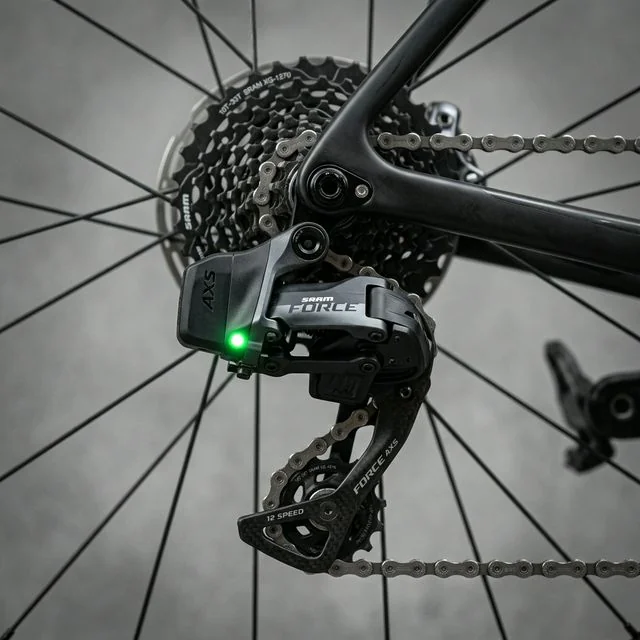
This is the most frequently reported issue among AXS users. Possible causes and troubleshooting steps:
Step 1: Check Battery Level
- Press the function button on the derailleur and observe the LED indicator
- Green light: sufficient charge
- Flashing red light: low battery, needs charging
- No light: battery may be completely drained or have poor contact
Step 2: Reinstall the Battery
- Press the battery release button and remove the battery
- Check the battery contacts for dirt or oxidation
- Wipe the contacts with a clean cloth
- Reinstall the battery and confirm you hear a “click”
Step 3: Re-Pair
If the battery is fine but there is still no response, the wireless pairing may have been lost:
- Simultaneously press and hold the function buttons on both the front and rear derailleurs for 5 seconds
- The LED starts flashing to indicate pairing mode
- Press the pairing button on the paddle
- The LED turns to a solid green light to indicate successful pairing
Step 4: Firmware Reset
If none of the above steps work:
- Remove both batteries
- Wait 30 seconds
- Reinstall the rear derailleur battery first
- Then reinstall the front derailleur battery
- Check the firmware version and update via the AXS App
Issue 2: Inaccurate Shifting, Chain Skipping, or Unusual Noises
Electronic shifting offers far greater adjustment precision than mechanical shifting, but correct mechanical setup is still required.
Cause Analysis:
- Incorrect rear derailleur mounting angle
- Bent derailleur hanger
- Worn chain
- Worn cassette or chainrings
Diagnostic Steps:
-
Use the AXS App for Micro-Adjustment
- Open the AXS App → Select rear derailleur → Micro Adjust
- Adjust one increment at a time, then test shifting performance
- Adjust toward +: moves the jockey wheel toward the larger cassette sprockets
- Adjust toward -: moves the jockey wheel toward the smaller cassette sprockets
-
Check Whether the Derailleur Hanger Is Bent
- Use a derailleur hanger alignment tool to check
- SRAM AXS uses the UDH (Universal Derailleur Hanger), which is relatively less prone to bending
- However, it should still be checked after an impact
-
Confirm B-Tension Setting
- Shift to the largest sprocket
- The gap between the jockey wheel and the sprocket should be within the manufacturer’s recommended range
- Too close will cause contact; too far will affect shifting quality
Issue 3: Abnormal Feel of the Handlebar Paddle Buttons
Stuck or Cannot Be Pressed:
- May be caused by internal moisture condensation (common in winter)
- Leave the paddle at room temperature for a period of time
- Blow the interior dry with low-pressure air
- Avoid using lubricants such as WD-40, as they may damage internal electronic components
No Tactile Feedback When Pressed:
- The button spring may have aged
- Needs to be returned to a dealer for replacement of the paddle assembly
Common Shimano Di2 Issues
Issue 1: Completely Unable to Shift
Step 1: Check Battery Level
- 12-speed system: press and hold the front derailleur button for 2 seconds to check the LED
- Green light: battery > 50%
- Red light: battery < 25%
- No light: dead battery or malfunction
- 11-speed system: press the button on the junction box to check the indicator light
Step 2: Check Connections (11-Speed Wired System)
- Confirm all E-Tube connectors are firmly inserted
- Check cables for kinks or damage
- Disconnect connectors, clean with contact cleaner, and reconnect
Step 3: System Reset
12-speed system reset method:
- Ensure both the front and rear derailleurs are on the smallest gear position
- Simultaneously press and hold the front and rear derailleur buttons for 10 seconds
- Release after the LED flashes rapidly
- The system will initialize automatically
11-speed system reset method:
- Disconnect the battery
- Wait 10 seconds
- Reconnect the battery
- Check using the E-Tube Project software
Issue 2: Delayed or Slow Shifting
Normal Di2 shifting should be instantaneous. If you notice significant delay, possible causes:
Low Battery:
- Di2 reduces shifting speed at low battery levels to conserve power
- Charge and observe whether performance returns to normal
Outdated Firmware:
- Check and update firmware via the E-Tube Ride App
- Firmware updates frequently include optimizations to shifting logic
Wireless Interference (12-Speed System):
- 12-speed Di2 uses Bluetooth and ANT+ communication
- A large number of nearby wireless devices may cause interference
- Usually brief and does not affect normal use
Issue 3: Shimano Di2 12-Speed Pairing Issues
Since 12-speed Di2 transitioned from wired to semi-wireless architecture, pairing has become a new common issue.
Re-Pairing Steps:
- Open the E-Tube Ride App
- Select “Connection Management”
- Set the rear derailleur to pairing mode (press and hold the button until the LED flashes rapidly)
- Once the App detects the rear derailleur, pair the front derailleur and paddles in sequence
- After pairing is complete, perform a full shifting test
Common Causes of Pairing Failure:
- Phone Bluetooth is turned off or the version is too old
- Insufficient derailleur battery level (at least 20% required)
- Other Di2 systems nearby causing interference (common in bike shop environments)
General Troubleshooting Flow
Regardless of which system you use, follow this flow when encountering issues:
Shifting malfunction
├── Completely unresponsive
│   ├── Check battery → Charge
│   ├── Check connections → Reinstall/Reconnect
│   └── System reset → Firmware update
├── Inaccurate shifting
│   ├── App micro-adjustment → One increment at a time
│   ├── Check derailleur hanger → Align or replace
│   └── Check consumables → Chain/Cassette
├── Delayed shifting
│   ├── Battery issue → Charge
│   ├── Firmware issue → Update
│   └── Wireless interference → Test in a different environment
└── Unusual noises
    ├── Chain issue → Clean and lubricate
    ├── Alignment issue → Micro-adjust
    └── Mechanical wear → Check consumables
Preventive Maintenance Recommendations
Performing the following maintenance regularly can significantly reduce the likelihood of malfunctions:
- Monthly: Check firmware updates and battery health via the App
- Every bike wash: Avoid directing high-pressure water directly at the derailleurs and cable connections
- Every 500 km: Check chain wear (electronic shifting is more sensitive to chain wear)
- Annually: Have a professional technician perform a full inspection
- Before races: Fully charge, update firmware, and perform a complete shifting test
When Should You Seek Repairs?
In the following situations, it is recommended to hand the bike directly to a professional technician:
- Issues arise after the derailleur has suffered an impact
- Battery cannot be charged or drains rapidly after charging
- The App cannot detect the derailleur
- The derailleur emits abnormal motor sounds
- Cable outer sheathing is damaged or connectors are loose (Di2 11-speed)
Repairing electronic shifting systems requires specialized tools and diagnostic software. Attempting to fix them yourself may cause further damage. Finding a bike shop with electronic shifting repair certification is the best way to protect your investment.
Related Reading
- Electronic Shifting System Maintenance: Daily Care Essentials for Di2 and AXS
- Electronic Shifting System Maintenance: Battery Management and Firmware Update Essentials
- Practicality and Maintenance Cost Assessment of Electronic Shifting Systems (Di2/AXS)
- Complete SRAM AXS System Setup Guide: App Operation and Shift Mode Adjustment