Beyond Strava: A Complete Comparison of Cycling Apps – Komoot, RideWithGPS, Wahoo, and More
文章導覽
Beyond Strava: A Complete Comparison of Cycling Apps — Komoot, RideWithGPS, Wahoo and More
Strava is undoubtedly the most popular app in the cycling world, but it leans more toward being a social and performance-recording platform — it isn’t the strongest when it comes to route planning and navigation. This article introduces several cycling apps that surpass Strava in specific functions, helping you find the digital tool that best fits your riding style.
App Feature Positioning Overview
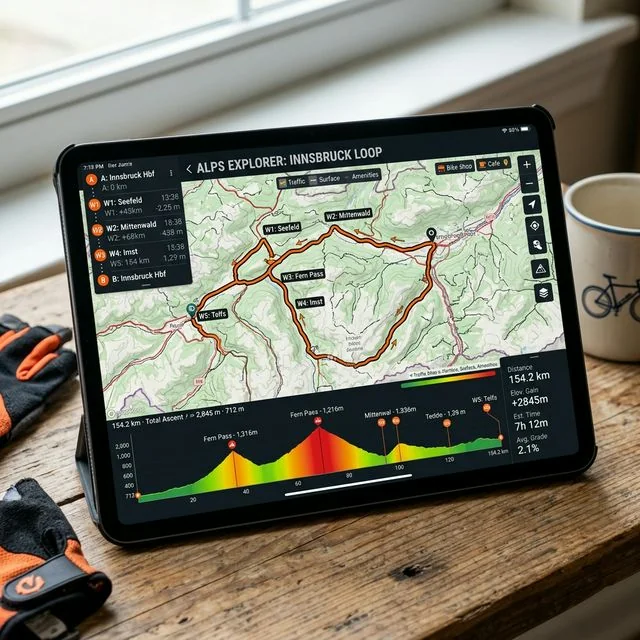
Before diving into the comparison, let’s first understand the core positioning of each app:
| App | Core Positioning | Strengths | Weaknesses |
|---|---|---|---|
| Strava | Social + Performance | Community, segment rankings | Route planning, navigation |
| Komoot | Route planning + Navigation | Map quality, turn-by-turn prompts | Social features |
| RideWithGPS | Route planning + Analysis | Advanced route editing, climb analysis | App interface |
| Wahoo ELEMNT | Head unit integration | Hardware integration, live tracking | Wahoo users only |
| Ride with GPS | Route database | User-shared routes | Limited free version |
| Cyclemeter | Recording + Analysis | Data detail | Route planning |
| Bikemap | Navigation + Routes | Global route database | Advanced analysis |
Komoot: The King of Route Planning
Why Komoot Is the Top Choice for Route Planning?
Komoot’s route planning engine is currently the smartest among all cycling apps. It doesn’t just draw lines on a map — it automatically selects the most suitable roads based on the activity type and fitness level you choose.
Activity Type Selection:
- Road Cycling: Prioritizes paved roads, avoids gravel roads
- Gravel Cycling: Mixes paved and unpaved roads
- Mountain Biking: Selects trails suitable for off-road riding
- Commuting: Prioritizes bike lanes and low-traffic roads
Surface Type Indication:
Komoot’s map uses different colors to indicate surface types (asphalt, gravel, dirt, singletrack, etc.), which is especially useful for gravel and mountain bikers. You can know the road surface condition of every section while planning your route.
Navigation Experience
Komoot’s turn-by-turn navigation is currently the most refined:
- Voice prompts for turns in advance
- Clear direction arrows displayed on the head unit
- Automatic recalculation when you deviate from the route
- Offline map support (paid feature)
Subscription Plans
- Free: One region map + basic route planning
- Single Region: NT$120 (one-time purchase)
- Worldwide Maps: NT$900 (one-time purchase)
- Premium: NT$1,800/year (offline maps, multi-day trips, sport-specific maps)
Recommendation: Start with the Worldwide Map Pack (one-time purchase of NT$900) — this is the best value option. The Premium subscription depends on your personal needs.
RideWithGPS: Advanced Route Editing and Analysis
The Level of Detail in Route Editing
RideWithGPS’s web-based route editor is the most powerful among all platforms. It offers:
Advanced Editing Features:
- Drag points one by one to adjust the route
- Set points of interest (POI) and rest stops along the route
- Import/export GPX, TCX, KML and other formats
- Route reversal and segment duplication
- Display multiple routes simultaneously for comparison
Climb Analysis:
- Automatically identifies every climb along the route
- Calculates distance, total elevation gain, and average gradient for each climb
- Displays climb profile charts
- Estimated completion time (based on your historical performance)
Route Database
RideWithGPS has a massive user-shared route database. You can search for routes shared by other riders by region, distance, elevation gain, and other criteria. This is especially useful when riding in unfamiliar areas.
Subscription Plans
- Free: Basic route recording and browsing
- Basic: USD $6/month — Advanced route planning, offline maps
- Premium: USD $10/month — Full features, including climb analysis and surface overlays
Wahoo ELEMNT Companion App
The Advantage of Hardware Integration
If you use a Wahoo ELEMNT series head unit (BOLT, ROAM, ACE), the Wahoo App is the best companion. It provides functions that the head unit cannot perform on its own:
Route Sync:
- Plan or import routes in the app
- One-tap sync to the head unit
- Supports importing routes from Strava, Komoot, and RideWithGPS
Live Track:
- Share your real-time location with family and friends
- Display riding speed, distance, and other information
- No additional app or account required
Head Unit Settings Management:
- Customize head unit page layouts
- Sensor pairing management
- LED light settings
- Firmware updates
Wahoo SYSTM Training Platform
Wahoo also offers the SYSTM training platform (formerly The Sufferfest), providing structured training plans and indoor riding videos. While this isn’t free, it’s an excellent tool for riders who take training seriously.
Other Apps Worth Noting
Bikemap
Bikemap has one of the world’s largest cycling route databases, with over 10 million routes. Its highlights include:
- Route rating and review system
- Surface type and difficulty indication
- Offline navigation
- E-bike-friendly route filtering
Cyclemeter
Cyclemeter is a favorite among data-obsessed riders, offering extremely detailed ride data analysis:
- Over 100 data metrics
- Custom training zones
- Voice announcements (customizable content and frequency)
- iCloud sync
- Apple Watch integration
MapMyRide (Under Armour)
If you’re part of the Under Armour ecosystem, MapMyRide offers:
- Route planning and navigation
- Integration with UA gear (shoes, heart rate straps)
- Social challenges and leaderboards
- Nutrition advice integration
Multi-App Combination Strategies
In real-world usage, very few riders rely on just one app. Here are several recommended combination strategies:
Strategy One: Strava + Komoot
The most popular combination. Use Komoot for route planning and navigation, and Strava for recording and socializing. The two can sync routes and ride records with each other.
Workflow:
- Plan the route on Komoot
- Sync the route to the head unit
- Use the head unit for navigation during the ride
- Ride records automatically upload to Strava
- Share and check segment rankings on Strava
Strategy Two: Strava + RideWithGPS
Suitable for riders who enjoy detailed route planning and climb analysis.
Workflow:
- Plan the route in detail on the RideWithGPS web version
- Analyze the route’s climb information and difficulty
- Export the route to the head unit
- Upload ride records to Strava for sharing
Strategy 3: Full Wahoo Ecosystem
Suitable for Wahoo bike computer users.
Workflow:
- Wahoo App manages the bike computer and sensors
- Import routes from Komoot or RideWithGPS
- Ride records automatically sync to Strava
- SYSTM for indoor training
App Suitability in Taiwan
When cycling in Taiwan, the map and route coverage of each app varies:
| App | Taiwan Map Quality | Chinese Support | Taiwan Route Database |
|---|---|---|---|
| Strava | ★★★★☆ | Full Chinese | Very Rich |
| Komoot | ★★★☆☆ | Partial Chinese | Moderate |
| RideWithGPS | ★★★★☆ | English primarily | Rich |
| Wahoo | ★★★★☆ | Partial Chinese | Depends on import source |
| Bikemap | ★★★☆☆ | Partial Chinese | Moderate |
Strava has the largest user base in Taiwan, with the richest route and segment data. If you primarily ride in Taiwan, Strava as a base app is essential, paired with Komoot or RideWithGPS to enhance route planning features.
Conclusion
No single app can perfectly meet all needs. The best strategy is to understand each app’s strengths and combine them according to your riding style and needs. Take some time to try different apps and find the digital riding tool combination that works best for you.
Related Reading
- Cycling App Recommendations: Strava, Garmin Connect, and Komoot Usage Insights
- Complete Comparison of Cycling GPS Navigation Apps: Komoot, RideWithGPS, and Strava Route Planning
- Taiwan Cycling Route App Recommendations: Komoot vs Strava vs RideWithGPS Comparison
- Essential App Reviews for Riding in Taiwan: Comprehensive Comparison of Strava, Garmin Connect, and RideWithGPS